Instagram carousels: what they are, how to make one, size and how many slides
A carousel is one post with up to 20 photos and videos. Here are Instagram's own rules on size and steps, and what 12,000+ carousels that took off look like.
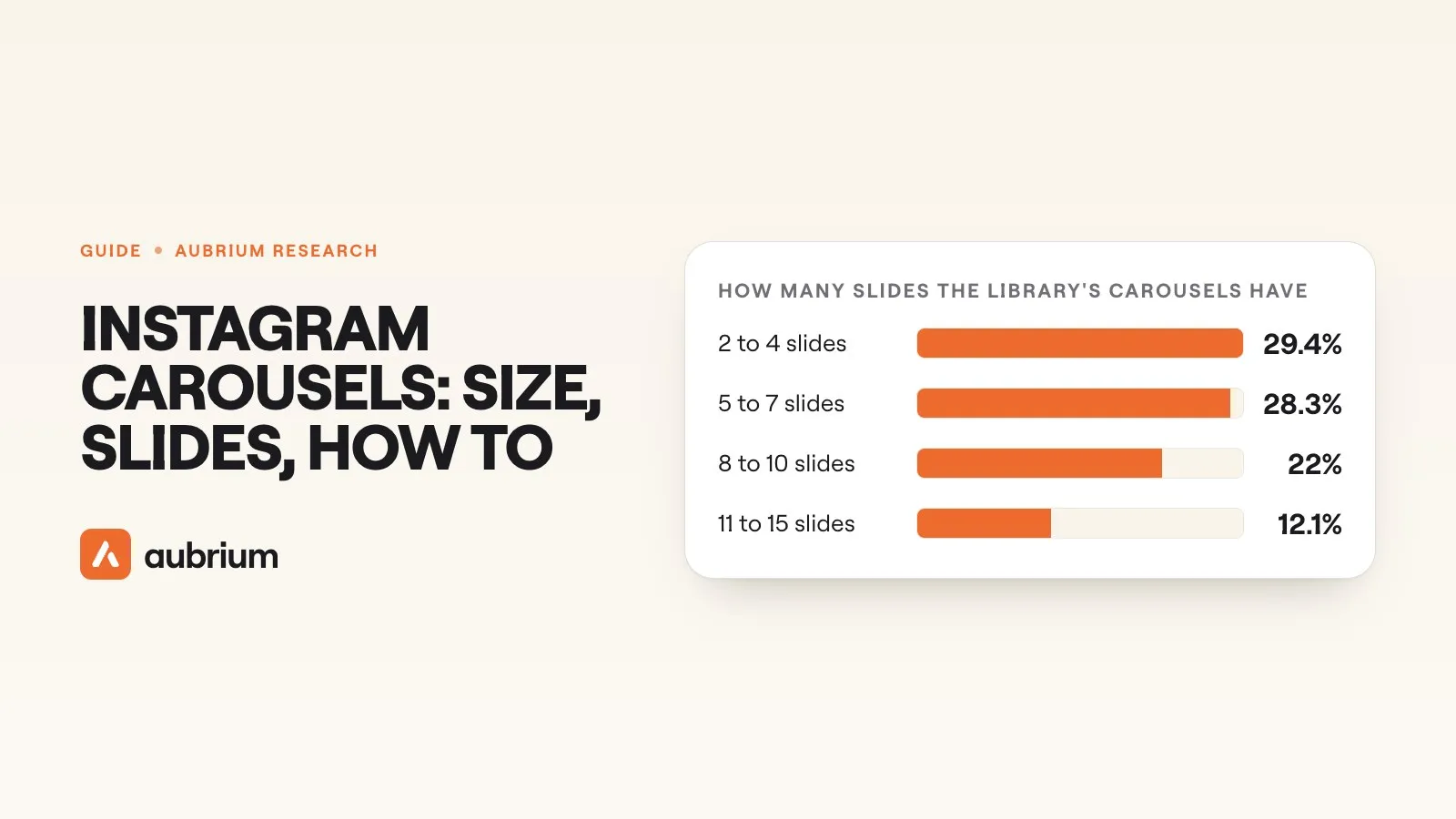
Instagram lets you put 20 photos and videos in one post. Most people who do well with carousels stop long before that. In Aubrium's library, the middle carousel has 7 slides.
That gap is the whole subject of this guide. There's what Instagram allows, which is written down on its own pages. And there's what people do, which we can count.
So we did both. We read Instagram's Help Center and Meta's pages for developers on 12 November 2026, and we quote them word for word. Then we counted the 12,000+ carousels in Aubrium's library, all from creators with 1,000 to 100,000 followers. If you're still choosing between a carousel, a reel or a plain photo, start with that guide and come back.
An Instagram carousel is one post with up to 20 photos and videos that people swipe through. Every slide shares one shape, and the tallest photo Instagram's Help Center supports is 3:4. Of the 12,000+ carousels in Aubrium's library on 12 November 2026, the middle one has 7 slides and 79.9% have 10 or fewer.
The limit is from Instagram's Help Center.1 The rest is Aubrium's library, 12 November 2026.
One warning before the numbers. Every carousel in the library had already taken off, so nothing here is the odds for your next one. And carousels carry no view count, so we never rank them against reels. We compare them with each other, on likes.
What is a carousel on Instagram?
A carousel is a single post that holds more than one photo or video. Instagram's Help Center puts it this way:1
“You can share a post with up to 20 photos and videos as a single post, also known as a carousel, to your Instagram feed.”
In the feed, people see your first slide with a row of dots under it. They swipe left for the rest. Likes and comments belong to the whole post. The same page says they "appear on the entire post, rather than on the individual photos and videos."1
You can mix photos and videos. But a video inside a carousel isn't a reel. Instagram says so plainly: "videos in carousels are not considered reels and will not show up in the Reels tab or have reels features."1
So the first slide does a big job. It's the only one everybody sees.
How do you make a carousel on Instagram?
You pick more than one photo or video when you start a new post. These are the Help Center's steps for the iPhone app, in its order.1
Start a post
Tap Create at the top, or swipe right anywhere in Feed. Tap POST, then tap SELECT MULTIPLE.
Pick your slides
Select up to 20 photos and videos from your phone's library.
Edit them
Tap a filter to apply it to every slide, or tap one slide to edit it by itself.
Set the order
Tap and hold a slide, then drag it to another spot.
Write the caption
Choose Single caption for one caption, or Multiple captions for one on each slide.
Tag, then post
Add one location for the post, and tag people on each slide. Then tap Share.
That's all Instagram asks of you. The hard part comes before step one: what goes on each slide, and in what order.
What size is an Instagram carousel?
For photos, Instagram's Help Center supports any shape from 1.91:1 (wide) to 3:4 (tall), at up to 1080 pixels wide. Its exact words:2
“When you share a photo that has a width between 320 and 1080 pixels, we keep that photo at its original resolution as long as the photo's aspect ratio is between 1.91:1 and 3:4 (a width of 1080 pixels with a height between 566 and 1440 pixels).”
Meta's page for developers gives a different range. It covers tools that post for you, and it still stops at 4:5.3 So there are two first-party answers, and here they are side by side.
| Instagram's Help Center (posting in the app) | Meta's developer page (a tool posts for you) | |
|---|---|---|
| Shapes supported | Between 1.91:1 and 3:4 | "Must be within a 4:5 to 1.91:1 range" |
| Tallest photo | 3:4, which is 1080 by 1440 pixels | 4:5 |
| Width | Kept as it is from 320 to 1080 pixels | Minimum 320, maximum 1440 |
| File | Not stated | JPEG, 8 MB at most |
| If the shape isn't supported | "it will be cropped to fit a supported ratio" | Not stated |
Neither page names "1080 by 1350" as a size, though you'll see it everywhere. That's 4:5 at 1080 wide, and it sits inside both ranges. If a scheduling tool posts your carousels, 4:5 is the tallest shape both pages accept.
The rule that catches people is the shared shape. The Help Center says:1
“Keep in mind that the orientation you choose (square, portrait or landscape) affects all of the photos or videos in your post. You can't select a different orientation for each photo or video.”
Through a tool it's stricter still. Meta's publishing page says carousel images "are all cropped based on the first image in the carousel, with the default being a 1:1 aspect ratio."4 Make every slide the same shape and none of this bites.
How many slides can an Instagram carousel have?
Twenty, in the app and through a tool. Meta's page for developers says carousels "are limited to 20 images, videos, or a mix of the two."4
Few carousels in the library go that far. The middle one has 7 slides, and the biggest group is the shortest: 29.4% have 2 to 4.
Two numbers stick out when you count slide by slide. Exactly 10 slides holds 8.4% of carousels, more than 8 or 9 do. Ten was the old limit, and plenty of people still fill to it. And exactly 20 holds 3.7%, as many as 11 slides and far more than 16, 17, 18 or 19. Some creators use every slot they're given.
We've written a narrower piece on how many slides a carousel should have, with what Meta says about slide count when it picks which posts to show.
Do more slides get more likes?
No, not in the library. The middle carousel drew likes equal to 7.5% of its creator's followers, and that figure barely moves with length.
For every count from 2 to 20, the figure sits between 6.4% and 9.4%. There's no climb and no drop. A 4-slide carousel and a 19-slide one both sit at 7.7%.
Account size moves it far more. For creators with 1,000 to 5,000 followers, the middle carousel drew likes equal to 36.9% of their followers. For creators with 50,000 to 100,000, it was 3.2%. Part of that is plain arithmetic: 700 likes is a lot against 2,000 followers. And the middle carousel has 7 slides in every size band.
Likes are what we can count from outside. They aren't the only thing Instagram reads, and we go through the others in saves, sends or likes.
What goes on the first slide?
About half the time, words. 53% of the library's carousels put text on the first slide, and 47% open on a picture alone.
The text-heavy "swipe for ten tips" deck is the minority here. Only 23% of carousels are heavy on text. Most are read as a story told across the slides (58.4%) or a plain set of pictures (33.3%). Tutorials and lists are rare, at 1.4% and 1.3%.
Hooks follow the same pattern. 58.1% of carousels have no hook line on the first slide at all. Where there is one, the most common kind opens a question and makes you swipe for the answer: 10.4% of carousels. Bold claims lead 7.3%, and 5.8% call out who the post is for.
Faces split down the middle. 48.5% of carousels show a face and 51.5% don't. Likes against followers were close on both sides of each split: with text or without, with a face or without.
One thing we can't show you is the lines themselves. Our data for this guide held the type of each first slide, not its words, so we've quoted none.
Which niches post carousels that take off?
Fashion and style holds the most carousels in the library, with art and design and photography behind it. Length shifts a little by subject.
| Category | Carousels in the library | Slides on the middle one |
|---|---|---|
| Fashion and style | 1,400+ | 6 |
| Art and design | 1,000+ | 5 |
| Photography | 920+ | 8 |
| Fitness | 870+ | 6 |
| Beauty and makeup | 770+ | 5 |
| Travel | 740+ | 9 |
| Food and recipes | 560+ | 7 |
| Parenting and family | 410+ | 8 |
| Real estate | 270+ | 8 |
Travel runs longest, at 9 slides for the middle carousel. A trip has a lot of pictures. Art and beauty run shortest, at 5, where one piece or one look can carry the post.
These counts say where the library holds carousels. They don't say where carousels are common on Instagram, or where they work best. For ideas by subject, see what to post on Instagram.
Can you add music to a carousel?
Yes, if every slide is a photo. Instagram's Help Center says "When you create a carousel post, you can add music," and the step is Add music. Then comes the catch: "Music cannot be added to carousels with videos."5
Sound can also change where the post shows up. Instagram told creators in 2025: "Now, when you add audio to photos and carousels, they may also appear in the Reels tab."6 Note the word "may". Instagram gives no number for how often.
Can you edit a carousel after posting it?
Yes, most of it. You can't add slides, though.
What you can change after a carousel is posted
- Yes: Reorder the photos or videos
- Yes: Remove a photo or video
- Yes: Edit the caption or captions
- Yes: Edit the location and the accounts you tagged
- No: Add a new photo or video
All five lines come from the same Help Center page. To make the changes, it says to open the three-dot menu on the post, select Edit, then long press to reorder. On adding slides it's blunt: "you can't add new photos or videos after you've shared the carousel".1
How to make a carousel people swipe through
Here's the evidence as a short plan. None of it is a promise. It's what the carousels that took off had in common.
Pick one shape and keep it
Every slide gets the same orientation. 4:5 is the tallest shape both of Meta's pages accept.
Let the idea set the length
The middle carousel has 7 slides, and likes barely moved with slide count. Stop at the last useful slide.
Make the first slide earn the swipe
It's the only slide everyone sees. A picture alone opens 47% of the library's carousels, so you don't need a headline.
Tell one story
Most carousels in the library read as a story or a set of pictures. One event, one look, one trip.
Add a song if it's all photos
Instagram says photo carousels with audio may also show in the Reels tab.
Check it before you post
You can reorder and remove slides later. You can't add one.
The caption has room too. The middle carousel in the library has a caption of 409 characters, and 89.1% carry at least one hashtag. Instagram's limit is lower than it used to be, so check how many hashtags to use first.
If the blank first slide is what stops you, Aubrium's Create writes a carousel for you. You still choose the photos.
Questions people ask
What is a carousel on Instagram?
A carousel is one Instagram post that holds up to 20 photos and videos. People see the first one in their feed and swipe to see the rest.
What size should an Instagram carousel be?
Instagram's Help Center supports photos from 1.91:1 to 3:4, up to 1080 pixels wide, so the tallest is 1080 by 1440. Meta's page for tools that post for you stops at 4:5. Every slide in one carousel has to share the same orientation.
How many photos can you put in an Instagram carousel?
Twenty photos and videos, by Instagram's Help Center and Meta's developer page. In Aubrium's library on 12 November 2026, the middle carousel has 7 slides and 79.9% have 10 or fewer.
How do you make a carousel post on Instagram?
Tap Create, tap POST, then SELECT MULTIPLE, and pick up to 20 photos and videos. Put them in order, write the caption and tap Share.
Can you add more photos to a carousel after posting?
No. Instagram's Help Center says you can reorder slides, remove them and edit the caption. You can't add new photos or videos once the carousel is shared.
Are there templates for Instagram carousels?
Yes. Design apps such as Canva offer carousel templates, but we haven't tested them, so we can't rank any. A template only sets the look. Whatever you use, export every slide in the same shape, because Instagram gives the whole post one orientation.
Do carousels show up in the Reels tab?
They can. Instagram says photos and carousels with audio "may also appear in the Reels tab." Videos inside a carousel are not treated as reels.
How we did this
We counted every carousel in Aubrium's library on 12 November 2026: 12,000+ carousels from 10,000+ creators with 1,000 to 100,000 followers, posted between August 2017 and October 2026. All of them had already taken off.
Carousels have no view count we can read. So "likes against followers" is the likes on the middle carousel of a group, as a share of its creator's followers. We use the middle one so a single huge post can't skew a figure. Text, faces, hook type and format describe the first slide and the deck.
The library holds only posts that took off. It can describe them. It can't give the odds for a new carousel, say what an average carousel gets, or rank carousels against reels.
Every fact about Instagram's own features comes from the pages below, read on 12 November 2026. Where two of Meta's pages disagree, we've shown both.
Sources
- Share a post with multiple photos or videos on InstagramInstagram Help Center · The 20-item limit, the steps, one orientation for every slide, and what you can edit after posting. Undated. Read 12 November 2026.
- Image resolution of photos you share on InstagramInstagram Help Center · Photo widths and the 1.91:1 to 3:4 range. Undated. Read 12 November 2026.
- IG User MediaMeta for Developers · Image rules for tools that post for you: 4:5 to 1.91:1, widths, JPEG, 8 MB. Updated 28 September 2026. Read 12 November 2026.
- Content PublishingMeta for Developers · Carousels limited to 20 items, and cropping based on the first image. Updated 20 October 2026. Read 12 November 2026.
- Add music to a post with multiple photos on InstagramInstagram Help Center · Music on photo carousels, and none on carousels with videos. Undated. Read 12 November 2026.
- Finding success on reels in 2025Instagram for Creators · Photos and carousels with audio may appear in the Reels tab. Undated. Read 12 November 2026.
Changelog
- First version.
Read next
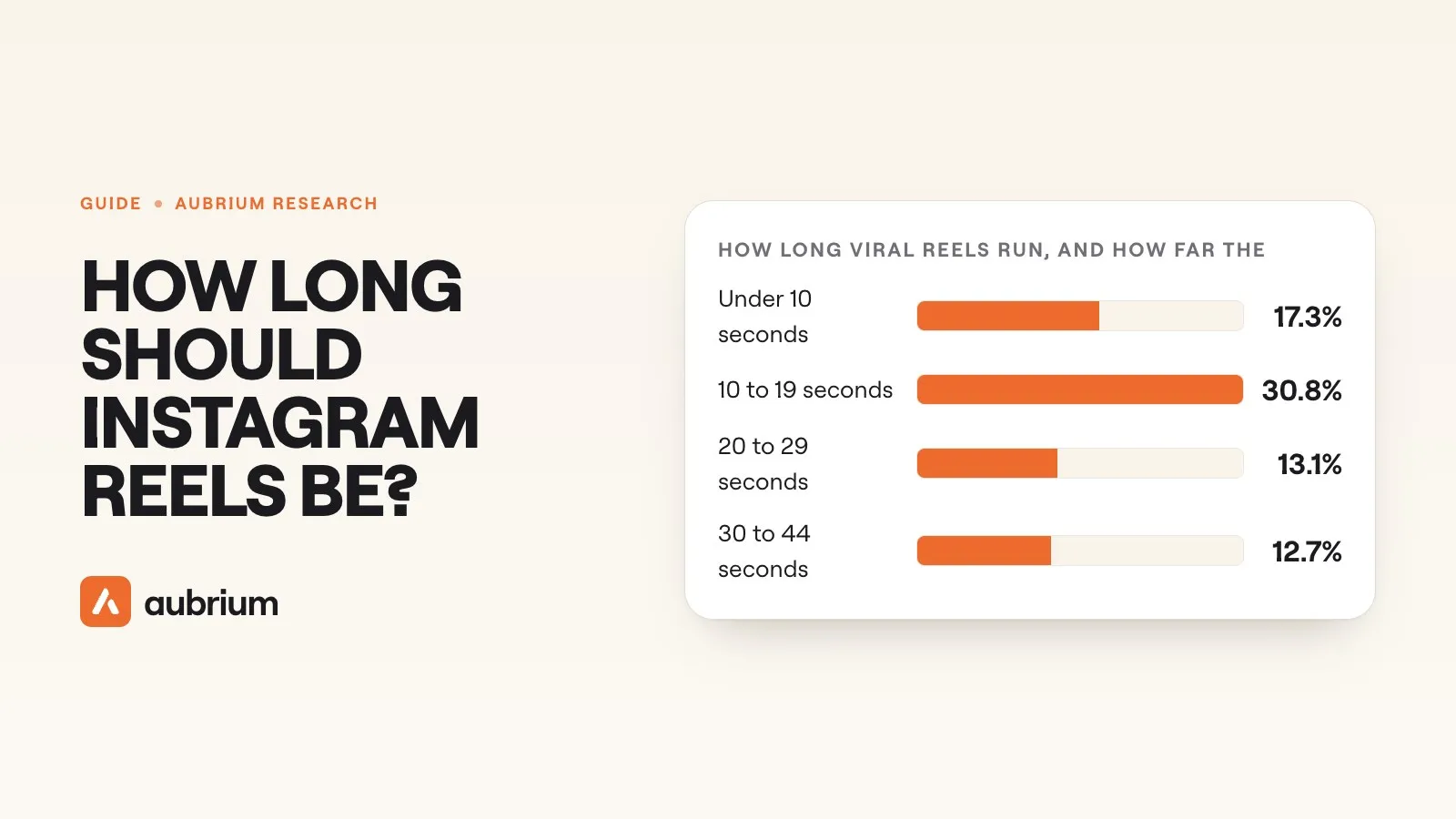 Formats & Craft11 min readHow long should Instagram reels be?Instagram gives three different limits for a reel and no best length. We measured 48,000+ viral reels: the middle one runs 21 seconds, and longer ones were shared more.
 Formats & Craft7 min readDo reels need text on screen?No, but most viral reels have some. Of more than 240,000 in Aubrium's library, 84% put words on screen, mostly a line or two, and half show the hook as text.
 Formats & Craft7 min readHow long should a reel hook be?We counted the words in the opening line of more than 110,000 viral reels. The middle hook is 10 words, and hooks shown as text run much shorter than spoken ones.