The best Instagram tools that work inside ChatGPT or Claude (2026)
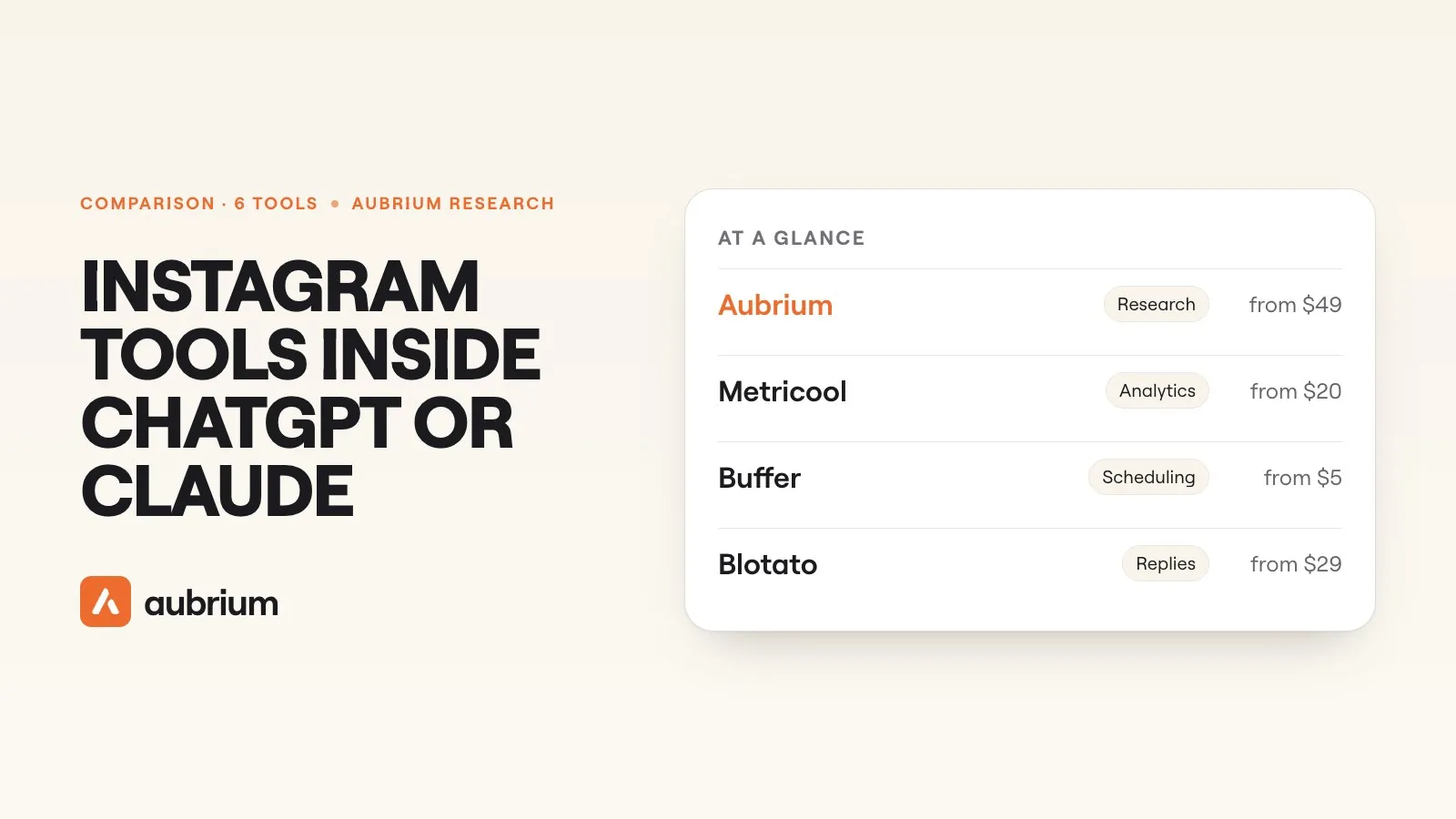
Six Instagram tools you can connect to ChatGPT or Claude, sorted by what each lets the chat do: research, analytics, scheduling or replies. With the plan each needs.
Ask ChatGPT what's going viral in your niche on Instagram this week, and it will give you a confident list. It hasn't looked. On its own, a chat assistant can't open Instagram, see your reach or read anyone's view counts. It answers from what it remembers and what it finds on the web.
A connector changes that. You link a tool to ChatGPT or Claude once, and from then on the chat can use that tool for you: pull your numbers, find posts, schedule a reel. Most of these connectors use a standard called MCP, which is why you'll see "MCP server" on every tool's site.
By November 2026, a handful of Instagram tools have one. They do very different jobs, and that's the part worth getting right before you connect anything. This guide sorts six of them by job. We make one, Aubrium. We read each of the other five from its own site on 12 November 2026 and link every page. We didn't test their connectors hands-on.
The best Instagram tools inside ChatGPT or Claude in 2026 depend on the job. For finding viral reels in your niche and writing your own version, Aubrium. For your own analytics and scheduling on a free plan, Metricool or Buffer. For publishing every format plus comments and DMs, Blotato, from $29 a month. Postiz is the open-source scheduler, and Lodestone looks up public profiles.
What can ChatGPT or Claude do with Instagram once a tool is connected?
Only what the tool allows. The chat doesn't get Instagram itself. It gets a short list of actions the tool has chosen to offer, and those fall into four jobs:
Research
Find posts from other accounts: what took off in a niche, what a rival posted, what a topic looks like right now.
Analytics
Read your own account's numbers and answer questions about them in plain words.
Publishing
Draft a post in the chat and schedule or publish it to your account.
Replies
Read comments and messages on your account, and answer them.
No tool here does all four. The schedulers cover analytics and publishing for the account you connect. The research tools read public posts and don't publish. Pick by the job you'd hand to an assistant first.
What should you check before you connect one?
Six things to check on any Instagram connector
- Yes: Which of the four jobs it does, in its own words
- Yes: Whether it's in ChatGPT's or Claude's own directory, or added by pasting a link
- Yes: Which plan includes the connector, and whether a trial does
- Yes: Whether it needs your Instagram account linked, and what kind
- Yes: Whether anything it posts waits for your OK first
- Yes: Who runs it, and how you disconnect it
The fifth line matters once a chat can publish. Buffer's posts "land in your Buffer queue as drafts or scheduled posts". Postiz asks for confirmation before each write by default, and tells you to "make sure there is always a human in the loop".
The 6 tools at a glance
| Tool | What the chat can do | Needs your Instagram linked? | Connector on which plan | Price from |
|---|---|---|---|---|
| 1. Aubrium | Find viral reels in your niche, write your version | Yes: No, it reads public posts | Any paid plan | $49/mo |
| 2. Metricool | Read your analytics, schedule posts | No: Yes, a professional account | Every plan, free included | Free plan |
| 3. Buffer | Draft, schedule, save ideas | No: Yes | Every plan, free included | Free plan |
| 4. Blotato | Publish every format, comments, DMs | No: Yes, with a Facebook Page | Paid only | $29/mo |
| 5. Postiz | Schedule to 30+ platforms | No: Yes, a professional account | Every plan | $29/mo |
| 6. Lodestone | Look up public profiles and topics | Yes: Not for public search | Free plan | Free plan |
The 6 tools, one by one
1. Aubrium
Viral reel library, with a writerFrom $49/moBest for: Finding what to post, and writing it, without leaving the chat
Aubrium is a library of Instagram posts that reached far more people than their creator has followers: more than 260,000 of them, all from accounts with 1,000 to 100,000 followers. Connect it to ChatGPT or Claude and the chat can search that library for your niche. The reels show up as cards you can play and save. It can also compare you with rivals you track, plan your week, and write your own version of a reel, with hooks, a script and captions.
It doesn't post, schedule or answer comments, and it never asks for your Instagram password. You add it by pasting one link and signing in with your Aubrium account. It isn't listed in ChatGPT's or Claude's directories yet. Searching needs a plan, and writing uses Sparks from that plan, the same as in the app.1
- Pricing
- $49, $99 or $249 a month. Every plan has every tool.2
- Trial
- No free plan or trial. A first plan is refundable within 15 days.3
- Works in
- Claude, ChatGPT, Cursor, Perplexity
- Real viral reels from accounts your size, inside the chat
- No Instagram account to link
- Writes hooks, scripts and captions from a reel that worked
- Doesn't post, schedule or reply
- Added by link, not from a directory
- No free plan
2. Metricool
Scheduler + analyticsFreeBest for: Your own analytics and scheduling, on a free plan
Metricool is a scheduler with analytics, and its connector is the most complete of the free ones. The chat can read your "Instagram posts with metrics for a given date range", your reels and stories, schedule posts, and use Metricool's best time to post. It can see competitors too, but only "competitors you've added to your account".
Its help centre says "MCP access does not require a paid Metricool plan". The free plan's limits still apply: 20 scheduled posts a month and 30 days of analytics. Inbox messages and post comments are "not available through the MCP at the moment". You need a professional Instagram account, linked through a Facebook Page for the full feature set.4
- Pricing
- A free plan; Starter from $20 a month, before VAT4
- Works in
- Claude (an official connector), ChatGPT, Cursor and others
- Works on the free plan
- An official Claude connector
- No comments or DMs
- Doesn't find posts from accounts you haven't added
3. Buffer
SchedulerFreeBest for: Drafting and scheduling from the chat
Buffer's connector lets you "draft posts, schedule them, and check what's coming up right in Claude, ChatGPT, or the other tools" you use. It can also save ideas and "pull your Buffer insights and turn them into plain answers about what to post next".
Buffer says "MCP access is included on every plan, including Free". The free plan connects 3 channels with 10 scheduled posts each. Posts made in the chat land in your queue for you to check. Its pages don't mention comments, DMs or other people's posts, and a personal Instagram account can only publish by reminder.5
- Pricing
- A free plan; Essentials from $5 a channel a month, billed yearly5
- Works in
- Claude, ChatGPT, Cursor, Perplexity and others
- On the free plan, for 3 channels
- Posts wait in your queue
- A publishing tool: no research on other accounts
- Nothing on comments or DMs in the chat
4. Blotato
Publishing, comments and DMsFrom $29/moBest for: Letting the chat publish and reply
Blotato does the most on your own account. Its Instagram page says the chat can "post feed posts, carousels, Reels, Stories", schedule them, "pull performance metrics back off your Instagram posts", "list comments on your Instagram posts and reply to them", and read and answer messages. It calls itself "an official ChatGPT plugin", and says it's in Claude's directory too.
It's paid only: "MCP access starts on a paid plan from $29/mo", and the 7-day trial "covers the web app but not MCP". Blotato itself says publishing from ChatGPT's Plus and Pro plans "is not confirmed yet". Instagram needs "a Business or Creator account linked to a Facebook Page".6
- Pricing
- Starter $29, Creator $97, Agency $499 a month6
- Works in
- ChatGPT, Claude, Cursor and others
- Every post format, plus comments and DMs
- In both official directories, per its site
- No free way to use it in a chat
- Doesn't search other accounts' posts
5. Postiz
Open-source schedulerFrom $29/moBest for: Scheduling to many platforms at once
Postiz is an open-source scheduler. Its connector lets Claude, ChatGPT, Cursor and Codex "schedule and publish posts to 30+ platforms", Instagram included. It lists your channels, writes and schedules posts, and reads analytics. Its site says the official connectors in both directories "install in one click".
"Every plan includes the MCP server", but there's no free hosted plan: a 7-day trial, then from $29 a month. Its docs are plain about replies: "there is no agent that watches for incoming comments and replies on your behalf". Instagram needs a professional account.7
- Pricing
- $29, $39, $49 or $99 a month; less billed yearly7
- Works in
- Claude, ChatGPT, Cursor, Codex
- One-click connectors in both directories, per its site
- Open source, 30+ platforms
- No free hosted plan
- A scheduler only: no research, no replies
6. Lodestone
Read-only connectorFreeBest for: A quick look at a public profile
Lodestone is a small hosted connector with an Instagram part that only reads. Its page says it can "look up a public profile: follower count, bio and recent content", "search Instagram content by topic", and pull insights for your own Business or Creator account if you add your own Meta token. "Public search needs no account."
It's the only other tool here that reads accounts you don't own. It doesn't post. You add it by link, its site names no company behind it, and it doesn't say where its public data comes from. Its results aren't filtered to posts that took off.8
- Pricing
- A free plan with 100 credits a month; Pro $19 a month8
- Works in
- Claude, ChatGPT in Developer Mode, Cursor and others
- Public profiles without linking an account
- A free plan, no card
- Read-only, and no named company
- Not a library of viral posts
Which jobs does each one cover?
What each connector lets the chat do, per its own site
- Yes: Research on other accounts: Aubrium (a library of viral posts) and Lodestone (profile and topic look-ups)
- Yes: Your own analytics: Metricool, Buffer, Blotato, Postiz, and Lodestone with your token
- Yes: Scheduling and publishing: Metricool, Buffer, Blotato, Postiz
- Yes: Comments and DMs: Blotato only
- No: All four in one tool: none
Aubrium also reads your own posts, to show how they match what goes viral in your niche. It doesn't need your account linked for that either.
So the useful pairings are simple. A research tool tells the chat what's worth making. A scheduler lets the chat put it on your calendar. Both can sit in the same conversation: Claude and ChatGPT let you connect more than one tool.
Is it in the directory, or do you paste a link?
Both ways work. A directory listing is a button inside ChatGPT or Claude. A custom connector is a link you paste into the assistant's settings, then you sign in.
| Tool | How you add it |
|---|---|
| Metricool | An official Claude connector, and a ChatGPT app |
| Blotato | "An official ChatGPT plugin", and in Claude's directory, per its site |
| Postiz | Official connectors in both directories, per its site |
| Buffer | One-click sign-in for Claude and ChatGPT; its pages don't say directory |
| Aubrium | Paste a link, sign in with your Aubrium account |
| Lodestone | Paste a link; ChatGPT needs Developer Mode |
Pasting a link takes about a minute. The trade-off is trust: a directory listing has been through the assistant's own review, and a pasted link hasn't. Either way, connect tools from companies you'd give the same access to in their own app.
Which one is right for you?
| If you want the chat to… | Pick |
|---|---|
| find what's going viralin your niche | Aubrium |
| write a scriptfrom a reel that worked | Aubrium |
| explain your own numberswithout paying | Metricool |
| schedule postson a free plan | Buffer or Metricool |
| publish reels, stories and carousels | Blotato |
| answer comments and DMs | Blotato |
| post to many platformsat once | Postiz |
| check one public profilequickly | Lodestone |
Questions people ask
Can ChatGPT connect to Instagram?
Not directly. ChatGPT connects to tools that work with Instagram, such as Aubrium, Metricool, Buffer, Blotato and Postiz. What it can do then depends on the tool: research, analytics, scheduling or replies.
Can Claude connect to Instagram?
Yes, through a connector. Metricool is an official Claude connector, Blotato and Postiz say they're in Claude's directory, and Aubrium, Buffer and Lodestone connect with a link or a sign-in.
What is an Instagram MCP server?
MCP is the standard that lets a chat assistant use an outside tool. An Instagram MCP server is a tool's connector: it gives ChatGPT or Claude a set of Instagram actions, such as reading analytics or scheduling a post.
Is there an Instagram tool for ChatGPT with a free plan?
Yes. Metricool and Buffer include their connectors on their free plans, and Lodestone has a free plan with 100 credits a month. Aubrium, Blotato and Postiz need a paid plan.
Can ChatGPT post to Instagram for me?
With a scheduler connected, yes. Metricool, Buffer, Blotato and Postiz can schedule or publish to a professional Instagram account. Blotato says publishing from ChatGPT's Plus and Pro plans isn't confirmed yet.
Can ChatGPT find viral reels in my niche?
On its own it can only search the web. With Aubrium connected, it searches a library of more than 260,000 viral posts from accounts with 1,000 to 100,000 followers, and shows the reels in the chat.
Do these tools need my Instagram password?
No. The schedulers link your account through Instagram's or Facebook's own sign-in, and need a professional account. Aubrium and Lodestone's public search read public posts and link nothing.
How do I use Aubrium in ChatGPT or Claude?
Add a connector in the assistant's settings, paste Aubrium's link from its Integrations page, and sign in with your Aubrium account. Then ask something like "show me what's going viral in my niche".
How we did this
We read each tool's own site on 12 November 2026: its connector page, its pricing page and its help pages. We quote them where the wording matters, and where a site didn't say something, we say that. We didn't test the other five connectors hands-on, so nothing here says whose works most smoothly. Aubrium's connector is ours, and its line about the library comes from our own database.
The list started from the tools ChatGPT names when you ask it this question. We left one out, Porter Metrics, because its pages wouldn't load for us on the day, and we don't print what we can't read. For choosing a research tool outside the chat, our comparison of viral reel finders has our hands-on tests. Connectors change fast. If something here is out of date, tell us and we'll fix it and move the date. And yes, Aubrium makes this page.
Sources
- Can I use Aubrium inside ChatGPT or Claude?Aubrium Help Center · The assistants, the link and what you can ask. And Integrations. Read 12 November 2026.
- Aubrium pricingaubrium.com · Plans, accounts and Sparks. Read 12 November 2026.
- Can I get a refund?Aubrium Help Center · A first subscription refunded in full within 15 days. Read 12 November 2026.
- Metricool's MCPmetricool.com · What the connector reads and does. And MCP limits and plan requirements: free plan, no inbox or comments; connection types; pricing. Read 12 November 2026.
- Buffer MCP serverbuffer.com · What the connector does, every plan including Free. And pricing; using Instagram with Buffer. Read 12 November 2026.
- Blotato for ChatGPTblotato.com · The plugin, the paid plan, the trial. And its Instagram MCP page; pricing. Read 12 November 2026.
- Postiz MCPpostiz.com · Clients, directories, what it does. And pricing; its Instagram docs. Read 12 November 2026.
- Lodestone's Instagram connectorlodestone.studiocorsair.com · Public look-ups, own-account insights, no posting. And its home page: plans. Read 12 November 2026.
Changelog
- First version.
Read next
 Tools & Comparisons11 min readAubrium vs ChatGPT: which is better for Instagram reel ideas?ChatGPT writes hooks and scripts on any topic. Aubrium shows which Instagram reels already took off for accounts your size, and writes your version. How to use both.
 Tools & Comparisons11 min readIs the Edits app enough to find reel ideas?Edits is Instagram's own editor, and its Inspiration tab is a real source of ideas. Here's what Meta says it shows, where it works, and what it leaves out.
 Tools & Comparisons15 min readThe best Viral Sonar alternatives for finding viral reelsViral Sonar brings you the reels taking off in one niche, once a day. Eight alternatives, ours included: which ones you can search, and which write the script too.